Workout tracker
Workout Tracker with a Muscle Map
Log sets, reps and weight, and see which muscles you've worked on a recovery map.
Published by Peptade · Workout tracker · Updated September 2026
Workout Tracker logs a session the way you train: add exercises, then enter reps and weight for each set as you go. An optional rest timer starts after each set, with a rest length you choose.
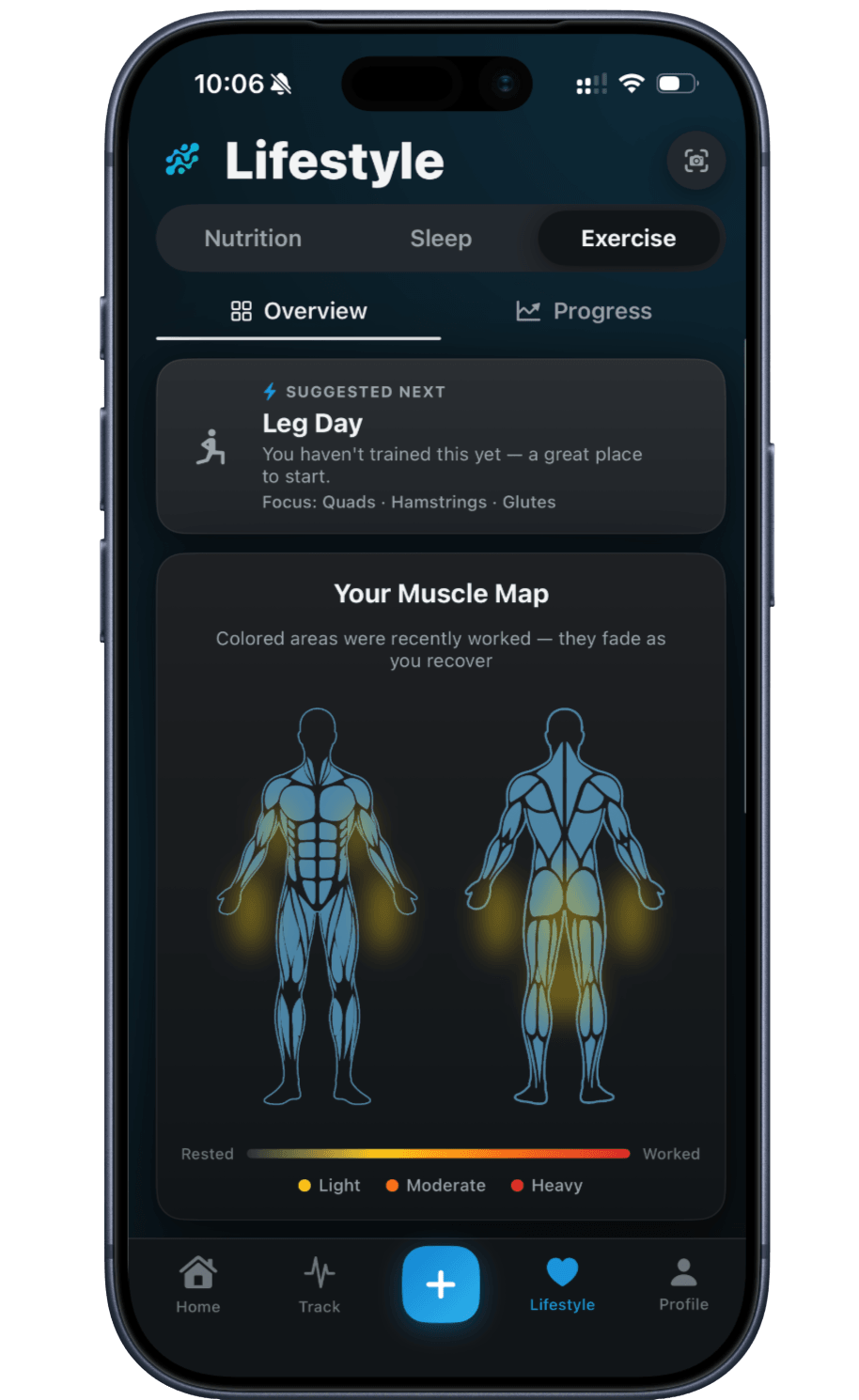
A muscle map colors the muscles you've worked by how hard each session hit them, then steps them back toward rested over the following days. It updates as you log new sessions, so you don't have to remember your last few workouts.
Every number here — sets, reps, weight, volume — is approximate and meant for general self-tracking, not a clinical or performance measurement. It's here to show a trend, not to grade a workout.
Training logged the way you train
Sets, reps & weight
Log each set as you go, with the weight and reps you actually did.
Heaviest-set chart
Pick an exercise to chart your heaviest completed set over time.
Muscle recovery map
See which muscle groups you've trained recently, shaded for recovery.
Weekly totals
Time, volume and sets for the weeks you step through, plus calories burned when Apple Health is connected.
Rest timer between sets
An optional timer starts after each set, with the rest length you pick.
Apple Health activity
On iOS, steps and calories burned from Apple Health show in the Exercise tab; workouts don't sync.
Frequently asked questions
No. You log the exercises, sets, reps and weight you did. The Overview suggests a next focus — the muscle group you trained longest ago — but there's no program behind it.
It colors each muscle by how hard your recent sessions worked it and fades it back toward rested over the following days — a general estimate for self-tracking, not a clinical or physiological measurement.
Yes. In the Progress tab, pick an exercise to chart your heaviest completed set over time, with the heaviest one noted under the chart. Nothing is flagged as a record automatically.
Not workouts. On iOS, with Apple Health connected, the Exercise tab shows your steps and calories burned from Apple Health, but workouts aren't imported from it or written to it.
Keep exploring
- Apple HealthApple Health Integration (iOS)Optional and iOS only: Peptade reads activity, sleep and weight from Apple Health and writes back the weight, water and nutrition you log.
- Nutrition trackerNutrition Tracker: AI Food & Barcode ScanScan a meal, menu or barcode to estimate calories, protein and macros — or log any meal by hand. Values are approximate.
- Weight trackerWeight Tracker with a Progress ChartLog a daily weigh-in in kg or lb, chart it over the range you pick, and see how far you are from a goal weight you set.
- Health calculatorDaily calorie (TDEE) calculatorEstimate total daily energy expenditure from your age, weight, height and activity level using the Mifflin-St Jeor equation and CDC activity guidance.
Track it in Peptade.
Doses, schedules, cycles, injection sites and supply — one app, free to download on iOS and Android.
Peptade is for tracking and education only. It is not medical advice, a diagnosis, or a prescription, and it does not tell you to take, start, stop or buy anything. See the Medical Disclaimer.