Stack tracker
Peptide Stack Tracker for Multiple Compounds
See every peptide and GLP-1 you're tracking side by side, each with its own dose and supply.
Published by Peptade · Stack tracker · Updated September 2026
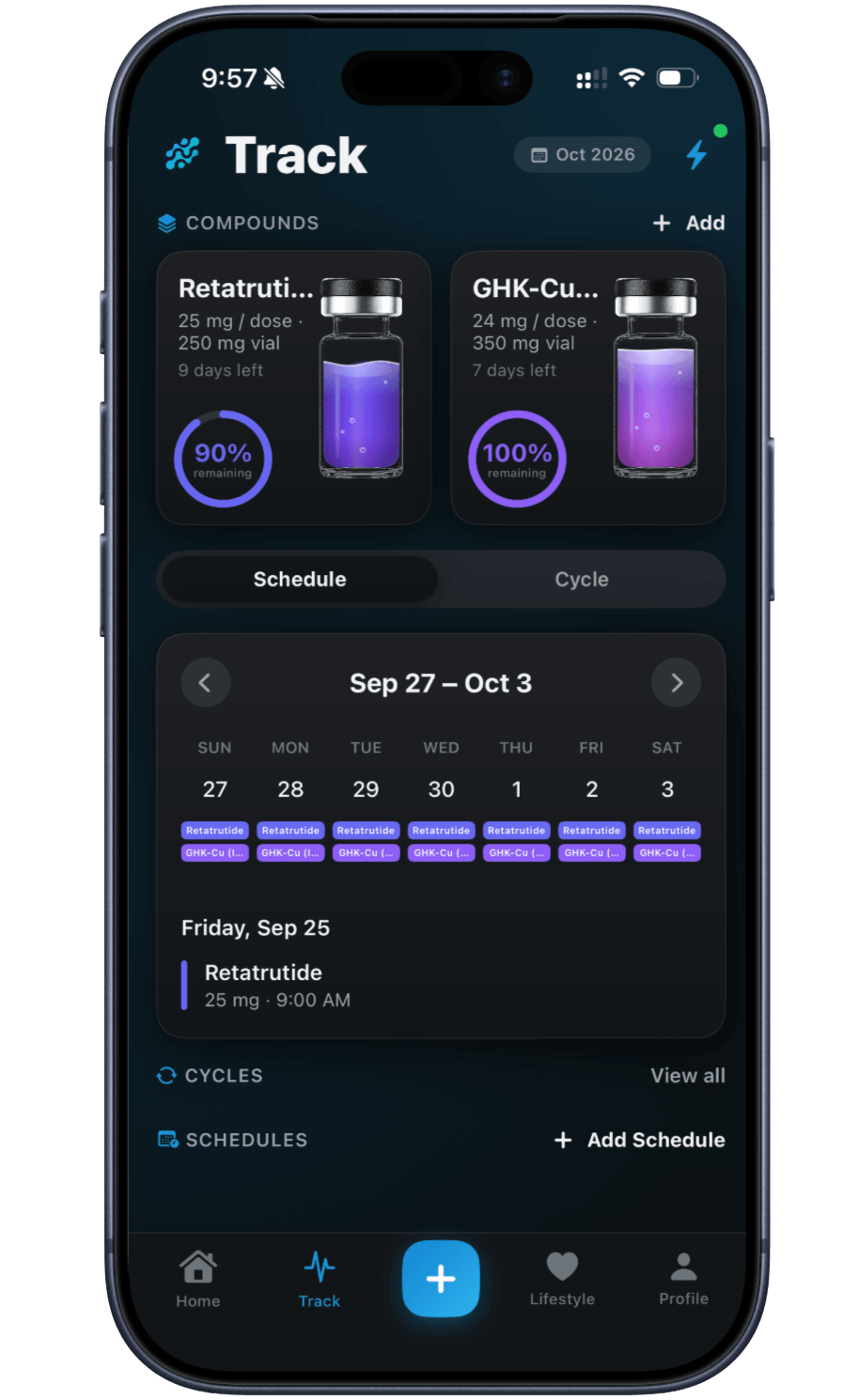
If you're tracking more than one compound, Peptide Stack Tracker lines them up together — one screen instead of switching between separate compound pages. It's built for the moment your routine grows past a single peptide or GLP-1.
Each compound keeps its own dose plan and supply countdown, whether it runs on a schedule of its own or shares a schedule or cycle with other compounds. Seeing them together on the Track tab changes nothing about any of them.
This is different from the personalized stack generator, which is an optional reading list matched to your goals. Stack Tracker doesn't recommend a compound to add — it only displays the ones you're already tracking, together.
One view across every compound you track
Side-by-side compound view
See the peptides and GLP-1s you're tracking together on the Track tab, instead of one page at a time.
One calendar for the stack
The Track calendar shows each day's due compounds as colored stripes.
A color for each compound
Each compound keeps its own color on its tile, on the Track calendar and in Dose History.
Today's doses in one list
Home lists today's scheduled doses across your compounds; tap one to log it.
Shared injection-site map
See the week's injection sites across every compound you track, for rotation.
Ask PepBot about your stack
PepBot can answer questions about the compounds and data already in your account.
Frequently asked questions
No. Peptide Stack Tracker only displays the compounds you're already tracking, side by side. The personalized stack is a separate, optional reading list matched to your goals — see Personalized Stack.
Add each compound you're using; the Track tab lists them all, two across, or in a full grid once you have more than two.
No. The Track tab only displays what you've set up. A compound's dose, schedule or cycle changes only when you edit it.
On each compound's own tile on the Track tab, so a vial running low doesn't hide among the others. See Peptide Vial Tracker for what the tile shows.
Keep exploring
- Peptide trackerPeptide Tracker: Doses, Cycles & SupplyLog every peptide and GLP-1 you take — doses, weekly schedules, on/off cycles, injection sites and vial supply, in one running history.
- Personalized stackPersonalized Stack: A Goal-Matched Reading ListAn optional, goal-matched reading list of compounds — name, route, regulatory status and a rationale, with no dose or schedule.
- Protocol trackerPeptide Protocol Tracker AppKeep a compound's whole routine — schedule or cycle, fixed dose or titration — together in one tracker, built from what you enter.
- PepBotPepBot: In-App Peptide Research AssistantPepBot, Peptade's in-app research assistant, knows your own tracking data and gives no dose, range or cycle for a compound that isn't FDA-approved.
- Vial trackerPeptide Vial Tracker: Supply & ReconstitutionTrack a vial's supply and reconstitution date, with a live countdown calculated from the doses you log.
Track it in Peptade.
Doses, schedules, cycles, injection sites and supply — one app, free to download on iOS and Android.
Peptade is for tracking and education only. It is not medical advice, a diagnosis, or a prescription, and it does not tell you to take, start, stop or buy anything. See the Medical Disclaimer.