Peptide tracker
Peptide Tracker for Doses, Cycles & Supply
One running log for every peptide and GLP-1 you take — doses, schedules, cycles and supply, without the spreadsheet.
Published by Peptade · Peptide tracker · Updated September 2026
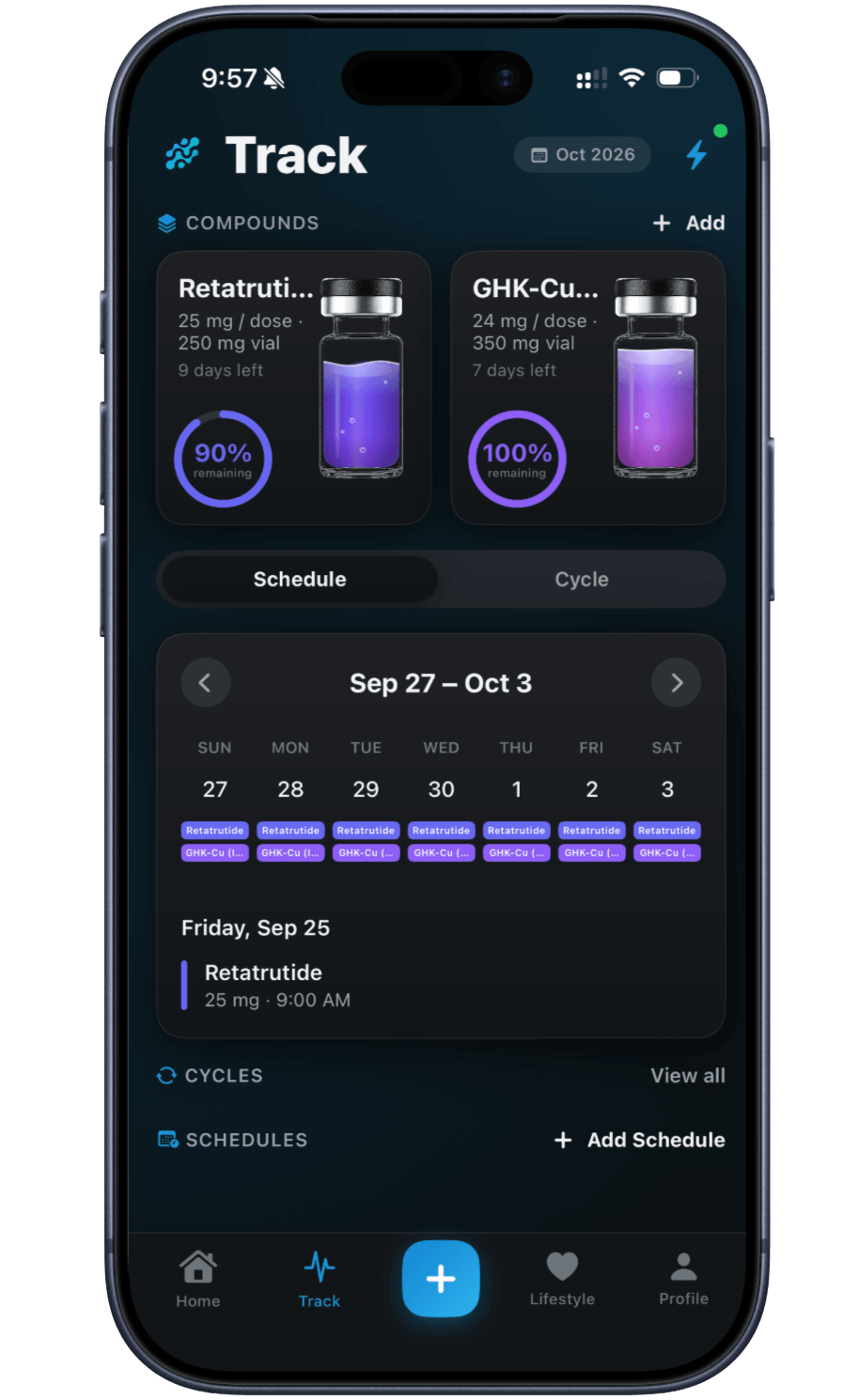
Peptide Tracker is the home base for anything you take. Add a compound once, and Peptade keeps its total amount, reconstitution date, dose plan and history together in one place.
Set a fixed dose or a multi-step titration, put the compound on a schedule or an on/off cycle, and the app lays out your dose days from that plan. Tapping a scheduled dose on Home opens a log form already filled in from it, where you add the injection site and any note.
Supply counts down as you log doses, so you see how much is left without doing the math yourself. Every amount, dose and plan in the tracker is one you entered — Peptade doesn't suggest a dose or fill in a starting point.
Everything a peptide log needs
Log from the Home screen
Tap a scheduled dose to log it with its date, amount, injection site and an optional note.
Schedules & on/off cycles
Put a compound on a schedule or an on/off cycle, and your dose days follow it.
Vial supply countdown
See how much of a vial is left as you log doses, calculated from what you entered.
Multi-step titrations
Step a dose up or down over time on a schedule you set, not one Peptade picks.
Injection-site history
Mark where you injected on a body map and see how many days ago you last used each spot.
Dose reminders
Local notifications nudge you when a dose is due, as a convenience — not a safeguard.
Frequently asked questions
No. Every dose, schedule, cycle and titration in the tracker is one you entered yourself. Peptade doesn't propose a starting point or a target — it only keeps track of what you set.
Yes. Add each peptide or GLP-1 you're tracking, and each keeps its own dose plan, supply and history. See Peptide Stack Tracker for how they sit together on the Track tab.
Peptide Vial Tracker covers that in full: what the Track tab shows as supply runs down, what happens when a dose would take more than is left, and how to start a new vial.
Your dose history sits in your account under row-level security, designed so only your account can read it. When AI features are on, PepBot sends a snapshot of your own data, including recent doses, to the AI provider to answer you. You can delete your data from Privacy Settings or request a copy under the Privacy Policy.
Keep exploring
- Cycle trackerPeptide Cycle Tracker: On/Off PatternsLog the on/off pattern you're following for a peptide and see its dose days on a calendar — Peptade doesn't suggest a pattern.
- Vial trackerPeptide Vial Tracker: Supply & ReconstitutionTrack a vial's supply and reconstitution date, with a live countdown calculated from the doses you log.
- Site trackerInjection Site Tracker & Rotation MapMark injection sites on a body map, see each week's injections at a glance, and check how many days ago you last used each site.
- Medication levelMedication Level: Estimated Half-Life CurveSee an estimated level curve for a compound, built from the half-life you enter and the doses you log — a visual model, not a measurement.
- CalculatorReconstitution calculatorConvert your vial amount, water and dose into concentration, syringe units and doses per compound — a free unit converter with no drug database or defaults.
Track it in Peptade.
Doses, schedules, cycles, injection sites and supply — one app, free to download on iOS and Android.
Peptade is for tracking and education only. It is not medical advice, a diagnosis, or a prescription, and it does not tell you to take, start, stop or buy anything. See the Medical Disclaimer.