GLP-1 injections
GLP-1 Injection Tracker & Site Rotation
Log every GLP-1 injection with its site, and check the week's sites on a body map.
Published by Peptade · GLP-1 injections · Updated September 2026
GLP-1 injections follow the schedule you've set for that compound, and it's easy to forget where the last one went. GLP-1 Injection Tracker asks for the site each time you log a dose, so the pattern is recorded instead of remembered.
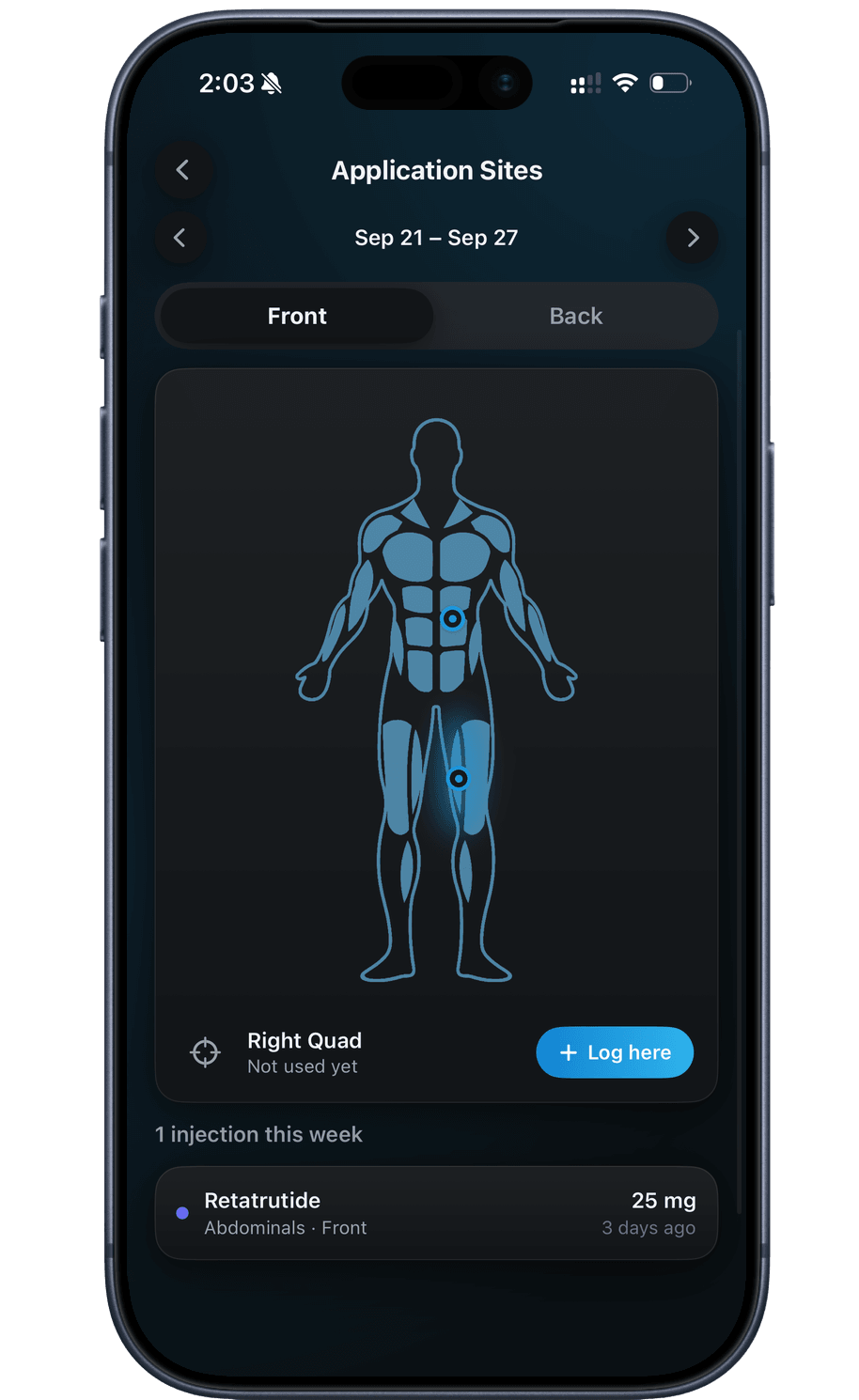
Before your next injection, open Application Sites to see this week's injections marked on the body map. Tapping a muscle shows how long ago you last used it, from your recent history.
Peptade doesn't recommend sites — site selection comes from a licensed healthcare provider. The map is a record of where you've injected, not advice on where to inject next.
Rotation built into every GLP-1 dose
Dose and site together
Date, amount and injection site go into one entry, so each dose stays linked to where it went.
Where the last one went
Application Sites shows this week's injections on the body map, with a count for the week.
Pain rating per injection
Rate each injection's pain on a slider, saved with that dose.
Log right from the map
Tap a muscle on Application Sites and choose Log here to open the dose form with that site marked.
Injection reminders
Local notifications nudge you toward your next scheduled dose — a convenience, not a safeguard.
Yours to delete
Injection history sits in your account under row-level security; delete it from Privacy Settings.
Frequently asked questions
Because the time between doses makes the last site easy to forget. A logged site is a record you can check on the map later, instead of a guess.
Step back week by week on the Application Sites map, or open Dose History to see your recent doses day by day, each with its site.
Yes. Each GLP-1 dose you log comes off the pen or vial's remaining amount. Peptide Vial Tracker explains the countdown and how to start a new pen or vial.
Yes. Use Log Past Dose in Dose History and set the date and time you took it; the form won't accept a time in the future.
Keep exploring
- Site trackerInjection Site Tracker & Rotation MapMark injection sites on a body map, see each week's injections at a glance, and check how many days ago you last used each site.
- GLP-1 trackerGLP-1 Tracker App for Doses & SupplyTrack semaglutide, tirzepatide or any GLP-1 with schedules, supply and history — built for the GLP-1 routine.
- Vial trackerPeptide Vial Tracker: Supply & ReconstitutionTrack a vial's supply and reconstitution date, with a live countdown calculated from the doses you log.
Track it in Peptade.
Doses, schedules, cycles, injection sites and supply — one app, free to download on iOS and Android.
Peptade is for tracking and education only. It is not medical advice, a diagnosis, or a prescription, and it does not tell you to take, start, stop or buy anything. See the Medical Disclaimer.