Reminders
Dose Reminders for Every Compound
Local notifications nudge you when a dose is due, based on the schedule you set.
Published by Peptade · Reminders · Updated September 2026
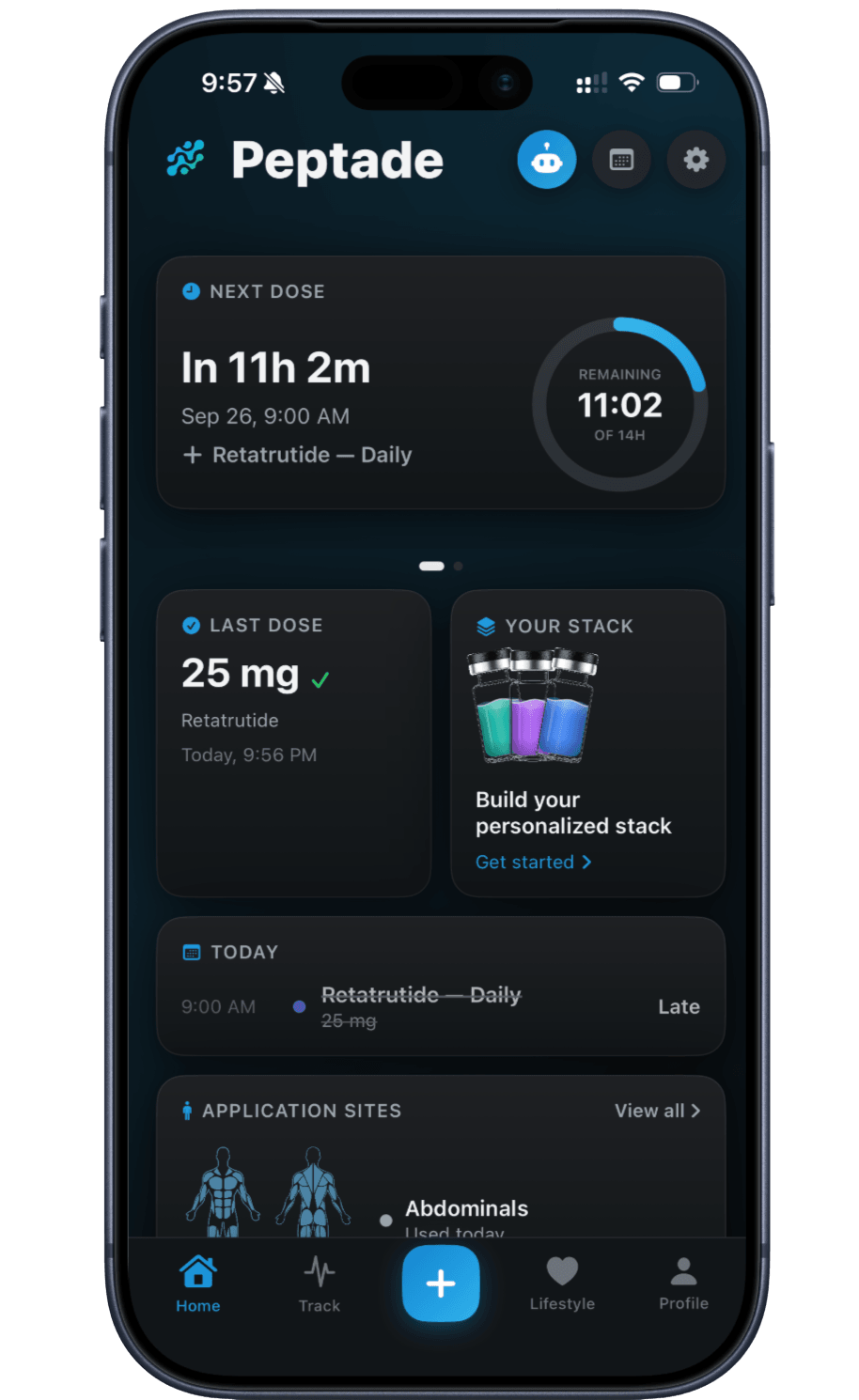
Dose Reminders schedules local notifications on your device from the times in the schedule or cycle you've set for each compound. Log a dose from its scheduled slot on Home and that slot's remaining alerts are dropped; a dose logged another way — from the plus menu, Log Past Dose or the site map — doesn't clear them.
A master switch in Notifications settings turns dose reminders on or off, with three timing options: a heads-up 15 minutes before a scheduled dose, an alert at the scheduled time, and a follow-up 30 minutes after. Meal, water, sleep and exercise reminders are separate daily notifications you set up in the same place.
Tapping a reminder opens Peptade; it doesn't log the dose — log it from its slot on Home. The app keeps up to the next 12 scheduled doses in the coming week queued as notifications, and tops that up each time you open it.
Reminders are a convenience, not a safeguard: device settings, operating-system behavior, Focus modes, low-power states and reinstalls can all delay, duplicate or drop a notification. Don't rely on a reminder — or the absence of one — to decide whether a dose is due, and don't treat the app's dose log as your only record of what you've taken.
Reminders that follow your schedule
Local device notifications
Reminders are scheduled on your device from the schedule you set — no server push required.
Follows schedules & cycles
Reminders are rebuilt from the new times when you change a compound's schedule or cycle.
One master switch
Turn every dose reminder on or off at once in Notifications settings.
Before, on time, after
Choose a heads-up before a dose, an alert at its time, and a follow-up afterward.
Built from all your plans
Reminders come from the upcoming scheduled doses across the compounds you track.
Log from the slot
Logging a dose from its slot on Home clears that slot's remaining alerts; other ways of logging don't.
Frequently asked questions
Not necessarily. Reminders are a convenience, not a safeguard. Device settings, Focus modes, low-power states and reinstalls can delay, duplicate or drop a local notification. Don't rely on a reminder, or its absence, to decide whether a dose is due.
At the times in the plan you set for that compound. In Notifications settings you can also keep or turn off a heads-up 15 minutes before and a follow-up 30 minutes after.
Yes. Saving a change to a schedule or cycle rebuilds its reminders from the new times, and deleting a plan drops them.
No. Tapping a reminder opens the app, and you log the dose from its slot on Home. A reminder never records a dose for you.
Not one at a time. Dose reminders share one master switch and the same timing options for every compound. You can also silence Peptade entirely in your device's notification settings.
Keep exploring
- Peptide trackerPeptide Tracker: Doses, Cycles & SupplyLog every peptide and GLP-1 you take — doses, weekly schedules, on/off cycles, injection sites and vial supply, in one running history.
- Protocol trackerPeptide Protocol Tracker AppKeep a compound's whole routine — schedule or cycle, fixed dose or titration — together in one tracker, built from what you enter.
- Hydration trackerHydration Tracker with Goals & RemindersLog water with quick-add buttons, see today's intake against a daily goal you can change, and set an optional daily reminder.
- Nutrition trackerNutrition Tracker: AI Food & Barcode ScanScan a meal, menu or barcode to estimate calories, protein and macros — or log any meal by hand. Values are approximate.
Track it in Peptade.
Doses, schedules, cycles, injection sites and supply — one app, free to download on iOS and Android.
Peptade is for tracking and education only. It is not medical advice, a diagnosis, or a prescription, and it does not tell you to take, start, stop or buy anything. See the Medical Disclaimer.