Nutrition tracker
Nutrition Tracker with AI Food Scanning
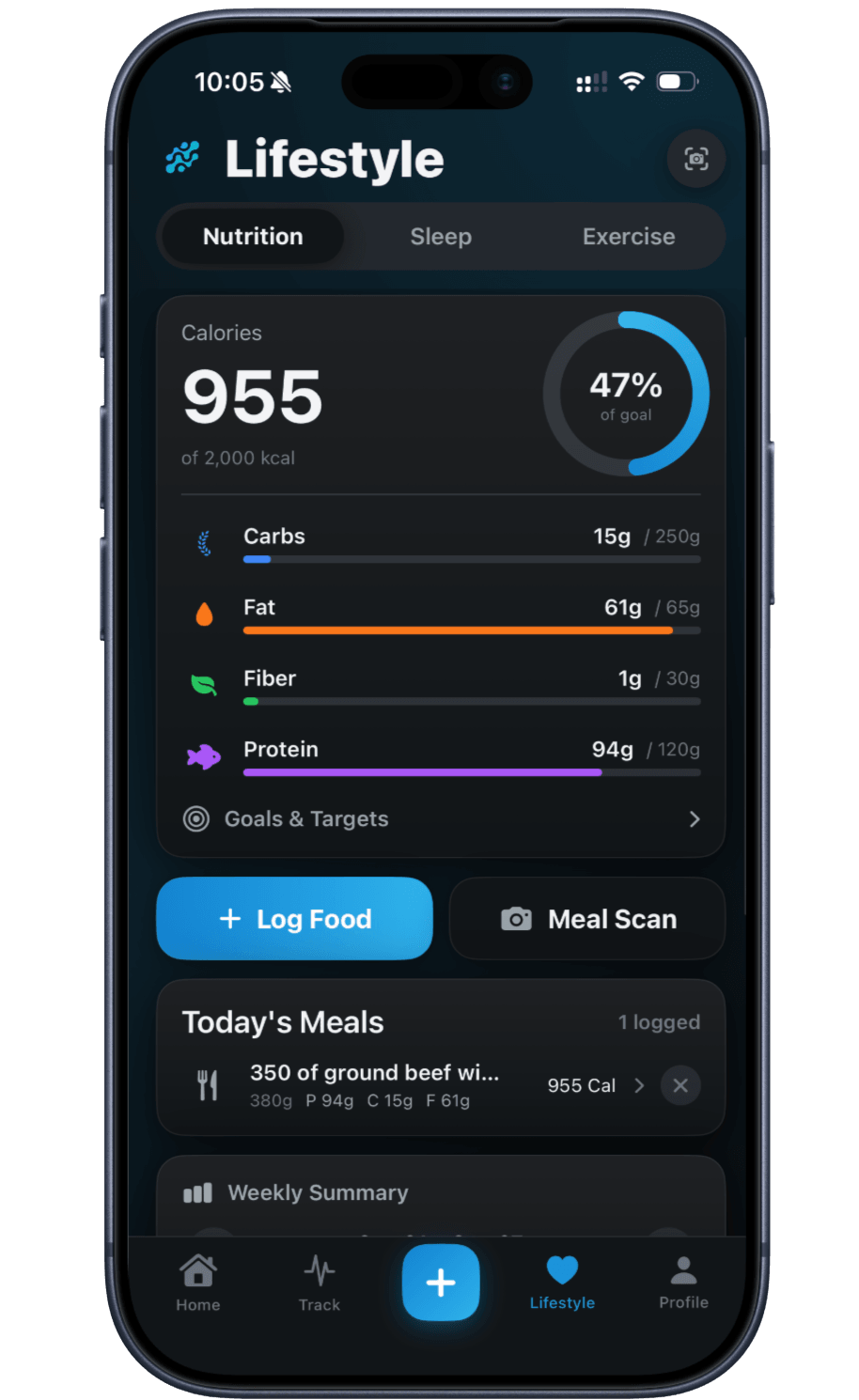
Scan a meal, a menu or a barcode, check the estimate, and log calories, protein and macros in a tap.
Published by Peptade · Nutrition tracker · Updated September 2026
Nutrition Tracker logs meals the fast way: photograph a plate or a menu and an AI food scanner estimates calories, protein and other macros, so you don't have to search a database by hand. Scan a barcode instead and the product is looked up in a public food database.
Prefer to type it yourself? Manual entry lets you describe a food and have AI estimate the macros, or enter them yourself, and saved foods and meals make repeats quicker.
Nutrition values from any scanner or calculator are approximate and meant for general self-tracking, not a clinical measurement. Treat the running total as a helpful estimate, not an exact figure.
Logging that keeps up with your day
AI food-photo scanning
Point the camera at a meal and get an estimated calorie and macro breakdown.
Menu & barcode scanning
Scan a menu to see dishes ranked against your goals, or a barcode to look up a packaged food.
Daily calorie & macro totals
See running totals for calories, protein, carbs and fat as you log.
Manual entry
Type in a meal yourself when you'd rather skip the camera.
Goals you can edit
Compare daily totals against calorie and macro goals you set yourself or calculate in the app.
Weekly summary
See the week's average calories, protein and fiber, and step back through past weeks.
Frequently asked questions
It's an estimate. Photo, menu and barcode scanning approximate calories and macros for general self-tracking — they aren't a lab measurement, and portions and preparation can shift the real number.
No. You can type any meal in manually, and it lands in the same daily total as a scanned one.
Meal and menu photos are sent to our AI provider for identification only, over an encrypted connection, and aren't kept as stored images by the app. A barcode scan sends only the barcode number to a public food database.
Yes. The weekly summary shows average calories, protein and fiber for the week you're viewing, and you can step back through earlier weeks.
Keep exploring
- Health calculatorDaily calorie (TDEE) calculatorEstimate total daily energy expenditure from your age, weight, height and activity level using the Mifflin-St Jeor equation and CDC activity guidance.
- Health calculatorDaily protein calculatorType your body weight and pick a general or active range to see a daily protein target in grams, backed by published nutrition research.
- Health calculatorGLP-1 protein calculatorA protein calculator with a range for active weight reduction on GLP-1 medicines, cited to a 2025 joint advisory from four U.S. medical societies.
- Hydration trackerHydration Tracker with Goals & RemindersLog water with quick-add buttons, see today's intake against a daily goal you can change, and set an optional daily reminder.
- Weight trackerWeight Tracker with a Progress ChartLog a daily weigh-in in kg or lb, chart it over the range you pick, and see how far you are from a goal weight you set.
Track it in Peptade.
Doses, schedules, cycles, injection sites and supply — one app, free to download on iOS and Android.
Peptade is for tracking and education only. It is not medical advice, a diagnosis, or a prescription, and it does not tell you to take, start, stop or buy anything. See the Medical Disclaimer.