Injection tracker
Injection Tracker App for Every Dose
Log every injection — compound, date, amount and site — in one app built for peptides and GLP-1s.
Published by Peptade · Injection tracker · Updated September 2026
An injection tracker app should do one job well: capture what you injected, when, and where, without slowing you down. Peptade logs a dose in one form and lays out your recent history by day.
Because the app is built for peptides and GLP-1s, each log records the compound, the amount, the time and, for an injectable, the site — and a dose logged from its scheduled slot on Home also records its schedule or cycle. Supply isn't stored on the log: each dose comes off the compound's remaining amount, which the Track tab shows separately.
Dose History lets you step through your log day by day on a calendar or scroll it as a list, with each entry's site, pain rating and notes. On the calendar, colored dots mark which compounds you logged each day.
Purpose-built for injection logging
Every field in one form
Compound, amount, time and site in a single form, with an optional pain rating and note.
Site rotation map
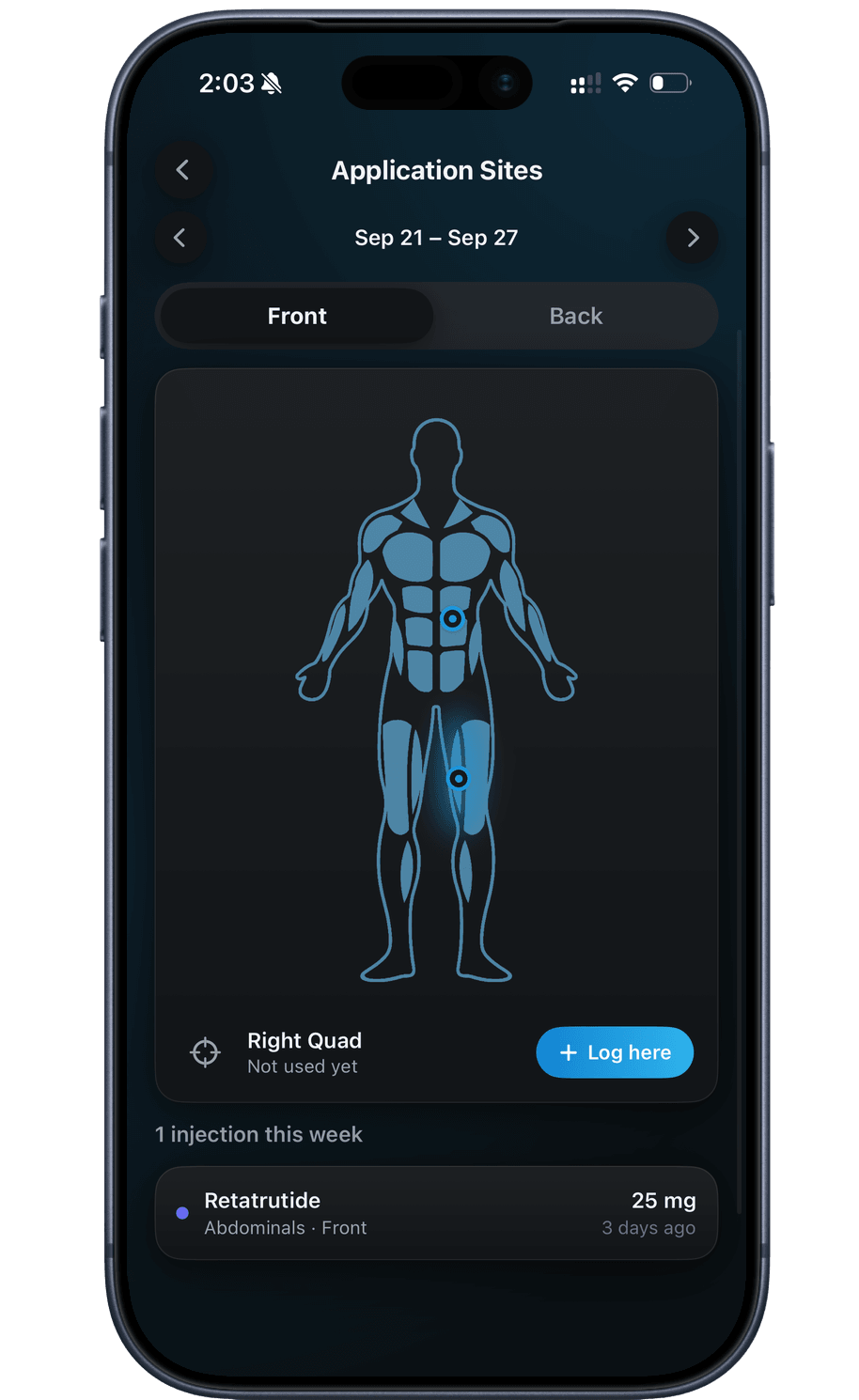
See this week's injections as dots on a front and back body map.
Calendar and list history
Switch between a month calendar and a day-by-day list of your logged doses.
Supply drops as you log
Each logged dose comes off that compound's remaining amount on the Track tab.
Dose reminders
A local notification at each scheduled dose time, as a convenience only.
Any compound, one app
Track peptides, GLP-1s and custom compounds side by side on the same Track tab.
Frequently asked questions
No. The log form fills in the amount from that compound's own plan, so you mostly confirm it and tap the site. Opened from a scheduled dose on Home, it picks the compound for you too.
You can delete it. In Dose History, open the entry's menu and choose Delete Dose, and any supply it used is added back. There's no edit option, so to fix a mistake, delete the entry and log it again.
No. Log a dose whenever you take it — from its scheduled slot on Home, the plus menu, Dose History or the site map — with or without a reminder scheduled.
Both. It sits in your account under row-level security; delete single doses in Dose History, or all your tracking data from Privacy Settings. There's no export button in the app — you can request a copy of your data under the Privacy Policy.
Keep exploring
- Site trackerInjection Site Tracker & Rotation MapMark injection sites on a body map, see each week's injections at a glance, and check how many days ago you last used each site.
- Peptide trackerPeptide Tracker: Doses, Cycles & SupplyLog every peptide and GLP-1 you take — doses, weekly schedules, on/off cycles, injection sites and vial supply, in one running history.
- GLP-1 injectionsGLP-1 Injection Tracker & Site RotationLog every GLP-1 injection with its site, see each week's sites on a body map, and keep pen or vial supply and dose history together.
Track it in Peptade.
Doses, schedules, cycles, injection sites and supply — one app, free to download on iOS and Android.
Peptade is for tracking and education only. It is not medical advice, a diagnosis, or a prescription, and it does not tell you to take, start, stop or buy anything. See the Medical Disclaimer.